Crash of Flair 3.4-5.3 in Geometry tab

Versions

Please provide the used software versions.

FLUKA: 4-5.2
Flair: 3.4-5.3
Operating system: Ubuntu 24.04.4 LTS under WSL

Description

With the latest version of flair, the program crashes every time I switch to the geometry tab. The error message in the console reads as follows:

X Error of failed request:  BadValue (integer parameter out of range for operation)
  Major opcode of failed request:  149 (GLX)
  Minor opcode of failed request:  3 (X_GLXCreateContext)
  Value in failed request:  0x0
  Serial number of failed request:  25158
  Current serial number in output stream:  25159

This happens with ALL input files, even the trivial “basic.inp”.
Checking again, it even happens when no input is loaded, just switching to the geometry tab crashes flair.

I update Flair regularly from the repository by the commands

`$ sudo apt update`
`$ sudo apt upgrade`

There was a similar topic previously on the forum and I try to answer the additional questions as far as I can:

gfortran -v
Using built-in specs.
COLLECT_GCC=gfortran
COLLECT_LTO_WRAPPER=/usr/libexec/gcc/x86_64-linux-gnu/13/lto-wrapper
OFFLOAD_TARGET_NAMES=nvptx-none:amdgcn-amdhsa
OFFLOAD_TARGET_DEFAULT=1
Target: x86_64-linux-gnu
Configured with: ../src/configure -v --with-pkgversion='Ubuntu 13.3.0-6ubuntu2~24.04.1' --with-bugurl=file:///usr/share/doc/gcc-13/README.Bugs --enable-languages=c,ada,c++,go,d,fortran,objc,obj-c++,m2 --prefix=/usr --with-gcc-major-version-only --program-suffix=-13 --program-prefix=x86_64-linux-gnu- --enable-shared --enable-linker-build-id --libexecdir=/usr/libexec --without-included-gettext --enable-threads=posix --libdir=/usr/lib --enable-nls --enable-bootstrap --enable-clocale=gnu --enable-libstdcxx-debug --enable-libstdcxx-time=yes --with-default-libstdcxx-abi=new --enable-libstdcxx-backtrace --enable-gnu-unique-object --disable-vtable-verify --enable-plugin --enable-default-pie --with-system-zlib --enable-libphobos-checking=release --with-target-system-zlib=auto --enable-objc-gc=auto --enable-multiarch --disable-werror --enable-cet --with-arch-32=i686 --with-abi=m64 --with-multilib-list=m32,m64,mx32 --enable-multilib --with-tune=generic --enable-offload-targets=nvptx-none=/build/gcc-13-EldibY/gcc-13-13.3.0/debian/tmp-nvptx/usr,amdgcn-amdhsa=/build/gcc-13-EldibY/gcc-13-13.3.0/debian/tmp-gcn/usr --enable-offload-defaulted --without-cuda-driver --enable-checking=release --build=x86_64-linux-gnu --host=x86_64-linux-gnu --target=x86_64-linux-gnu --with-build-config=bootstrap-lto-lean --enable-link-serialization=2
Thread model: posix
Supported LTO compression algorithms: zlib zstd
gcc version 13.3.0 (Ubuntu 13.3.0-6ubuntu2~24.04.1)
echo $PATH
/home/totto/fluka5/bin:/usr/local/sbin:/usr/local/bin:/usr/sbin:/usr/bin:/sbin:/bin:/usr/games:/usr/local/games:/usr/lib/wsl/lib:/mnt/c/Program Files/WindowsApps/MicrosoftCorporationII.WindowsSubsystemForLinux_2.7.3.0_x64__8wekyb3d8bbwe:/mnt/c/Users/totto/AppData/Roaming/MobaXterm/slash/bin:/mnt/c/WINDOWS/:/mnt/c/WINDOWS/system32/:/mnt/c/Program Files (x86)/Common Files/Oracle/Java/java8path:/mnt/c/WINDOWS/system32:/mnt/c/WINDOWS:/mnt/c/WINDOWS/System32/Wbem:/mnt/c/WINDOWS/System32/WindowsPowerShell/v1.0/:/mnt/c/Program Files/Wolfram Research/WolframScript/:/mnt/c/Program Files/Microsoft SQL Server/150/Tools/Binn/:/mnt/c/Program Files/PuTTY/:/mnt/c/Program Files/PowerShell/7/:/mnt/c/Program Files/Microsoft VS Code/bin:/mnt/c/Users/totto/AppData/Local/Programs/Python/Launcher/:/mnt/c/Users/totto/AppData/Local/Microsoft/WindowsApps:/mnt/c/Program Files (x86)/REFPROP/:/mnt/c/WINDOWS/sysnative/:/snap/bin:/usr/local/fluka/bin
 which python3
/usr/bin/python3
port echo requested
/snap/port/78/port/port: /lib/x86_64-linux-gnu/libc.so.6: version `GLIBC_2.30' not found (required by /snap/port/78/usr/lib/x86_64-linux-gnu/libnspr4.so)
/snap/port/78/port/port: /lib/x86_64-linux-gnu/libm.so.6: version `GLIBC_2.29' not found (required by /snap/port/78/usr/lib/x86_64-linux-gnu/libasound.so.2)
Dear @totto

the new flair contains also a new OpenGL layer for faster (almost interactive) 3D graphics but tesselated (=less precise than the default 3D ray tracing).
For some reason you cannot start a GL context, which normally flair should catch and report it but apparently it fails.

Please try the following:

  1. ensure you have the libGL installed in your system
sudo apt install libgl1-mesa-glx libgl1-mesa-dri mesa-utils

Normally running the glxinfo command should tell if there is an OpenGL renderer

  1. Start flair with the indirect opengl rendering requested
  export LIBGL_ALWAYS_SOFTWARE=1
  flair

Do you have WSL v1 or v2?

Dear @vasilis,
I have WSL2.
The command mentioned gives a disappointing result:

$ sudo apt install libgl1-mesa-glx libgl1-mesa-dri mesa-utils
Reading package lists... Done
Building dependency tree... Done
Reading state information... Done
Package libgl1-mesa-glx is not available, but is referred to by another package.
This may mean that the package is missing, has been obsoleted, or
is only available from another source

E: Package 'libgl1-mesa-glx' has no installation candidate

I then asked for
sudo apt install mesa-utils
Which led to some installation activity. The following request for glxinfo was however unsuccesful:

$ glxinfo
name of display: :0
X Error of failed request:  BadValue (integer parameter out of range for operation)
  Major opcode of failed request:  149 (GLX)
  Minor opcode of failed request:  24 (X_GLXCreateNewContext)
  Value in failed request:  0x0
  Serial number of failed request:  28
  Current serial number in output stream:  29

I’ve disabled the request of OpenGL for the Ubuntu 24.04. Can you please re-install flair, but first remove flair and update the packages

sudo apt remove flair flair-geoviewer
sudo apt update
sudo apt install flair

Thank you @vasilis, it works.
What does this issue mean for the future of Flair under Ubuntu24.04 ? Should WSL users envisage to switch, and if yes, to what ?

Normally it should have worked, and ubuntu 24.04 will be supported until it is phased out. My guess is that either you are missing a linux library or some windows driver. Despite there was a check to catch OpenGL problems, for some reason in your case it didn’t work. I’ve just added an extra layer of check to better ignore OpenGL errors instead of crashing.

If you want to test the operation of the extra OpenGL check, I can prepare a beta package of flair.

Hi @totto,

could you please run the command “glxinfo -B” on the terminal and post the output. Moreover, if you run the command “glxgears” on the terminal, does it show a window with running colored gears?

Cheers

Chris

With pleasure, @ctheis, but not very fruitful:

$ glxinfo -B
name of display: :0
X Error of failed request:  BadValue (integer parameter out of range for operation)
  Major opcode of failed request:  149 (GLX)
  Minor opcode of failed request:  24 (X_GLXCreateNewContext)
  Value in failed request:  0x0
  Serial number of failed request:  28
  Current serial number in output stream:  29

$ glxgears
Error: glXCreateContext failed

Hello @totto,

it looks as if the mesa GLX driver for OpenGL is missing on your Ubuntu installation. You are usually getting this via the libgl1-mesa-glx package (which works for me under Ubuntu 22) but as far as I could see, they changed the name of the package under Ubuntu 24. Can try if your package manager finds a libgl1 and libglx-mesa0 instead?

As Vasilis explained, the new OpenGL renderer can be disabled. Though, I think it is a quite useful feature and it works nicely under WSL and Ubuntu 22. It’s just a pity that they changed the package names.

Cheers
Chris

Hi @totto
in the beta version you can find the latest development version of flair. Can you please try it with your WSL setup to check if the fix works for you?
The OpenGL is still enabled in the beta, but there should be a more robust error handling on possible X11/OpenGL problems.

Hello @vasilis, the beta-version works fine. Thank you !

Hello @ctheis,
the two packages libgl1 and libglx-mesa0 are already installed:

libgl1 is already the newest version (1.7.0-1build1)
libglx-mesa0 is already the newest version (25.2.8-0ubuntu0.24.04.1)

Nevertheless, a call to glxinfo gives a similar error message as reported above and glxgears reports
Error: glXCreateContext failed

I wonder if this does not point to an issue between the terminal manager (MobaXterm v24.2) and W11 when trying to open a window. But here I am out of my competence and just guessing.

I tried the latest stable updates of the mesa drivers as described in How to Install Mesa Drivers on Ubuntu [Latest and Stable], but also there no glxinfo or glxgears. I rolled this installation back as described in the same source.
Best regards, Thomas

Hi Thomas

I am developing FLAIR under WSL/MobaX and Ubuntu, and it works. Yet, I am using Ubuntu 22 which seems to come with the right OpenGL drivers out of the box. In your case the problem indicated by the glxinfo message is a driver issue. I have to investigate this further.

Cheers

Chris

Hello @totto ,

it seems as if the OpenGL mesa drivers shipped with Ubuntu 24.04 are buggy and it seems to be a known issue of this release.

According to the info that I found an update to the latest drivers (as described in the link below) seems to resolve the issue, at least it worked for the people on the forum. Thus, it might be worth giving it a try:

Cheers
Chris

I also have WSL2 + discrete GPU card on my laptop:
lsb_release -a
No LSB modules are available.
Distributor ID: Ubuntu
Description: Ubuntu 24.04.3 LTS
Release: 24.04
Codename: noble

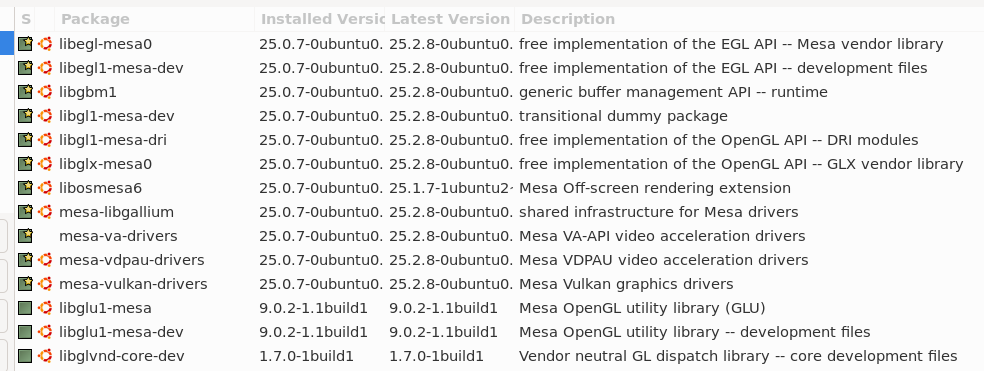
For me, it works with these packages: