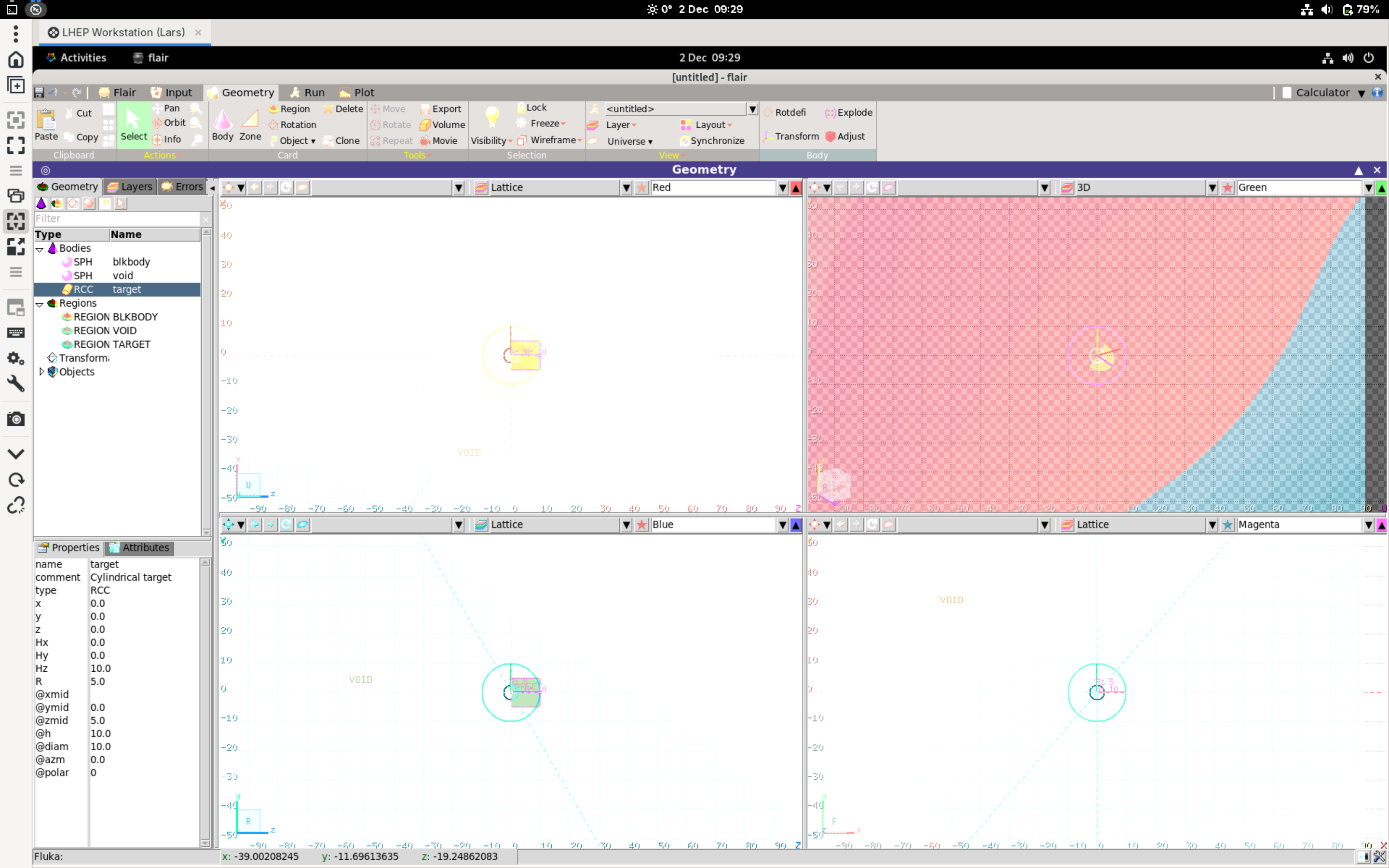
Thanks for all the help in my previous posts. I now have flair and flair-geoviewer installed from source, this works fine while I have a physical screen connected to the server and am logged in a Wayland session on GNOME 40.
Yet as this is supposed to be a Remote Server I need other users to be able to login via RDP (using xrdp on the server). However under RDP, Wayland sessions are not supported (yet?).
So when I log in remotely, a X11 session is created. Using a X11 session I have many graphical bugs (icons are blurred, colours are off) and the geoviewer shows the background partly (see attached screenshot). I do not have these issues under Wayland with a physical screen attached.
Also using X11, flair is very unresponsive, it takes several seconds to load a tab (after switching from one to the other).
Now my questions:
Are these known issues? I was not able to find anything related to this on the forum …
Is there a way to fix this?
Thanks again for all the help. Please let me know if you need more details.
I’m afarid that this is not a Flair problem, but with XRDP / Wayland / X11. I would suggest to try searching for solutions on general Linux related sites.
You may try to run flair with ssh -X x11 forwarding or with waypipe.
Also, VNC based remote desktop applications could work.
One note: If other uses will use FLUKA and Flair on the remote machine, they also need to have a valid license to do so.
Using ssh -X ... for x11 forwarding gets rid of the visual artefacts, but it is still very slow to load the tabs. Waypipe I was not able to get to work …
Using a VNC remote desktop also works but also here the tabs load incredibly slow (it is still a x11 session).
If I find a solution that also gets rid of the slow tab loading I will post it here.
How is this done at CERN or other facilities? I cannot be the only one who is trying to set up a Flair remote workstation?
Any insight on what tools you use would be greatly appreciated.
Regarding your note: Thank you for the hint. All persons with access to the machine have valid licences to use FLUKA and flair. The machine is shared only within our research group and our collaborators, who already use FLUKA on their own machines.
Flair should not be slow on a x11 session, there should be an issue with the computer/os.
I my personal work, I don’t use Flair remotely, but I mount the filesystem of the remote computer with sshfs, and I use the locally installed Flair to work on them. Then I start the simulations from the command line on the remote machine.
I have no clue why it is so slow, the machine is not a Supercomputer yes, but when I attach a display and log in a wayland session it works perfectly fine …
Anyway, thank you for your input. I will try to consider this approach.
I’m sorry to bother you so much. I hope my next post on the forum will finally be physics related and not installation stuff.
I will try a local X11 sesstion as soon as I have physical access to the machine again.
with the -XC argument it looks and feels the same as before. In case you are curious how it looks, I made a short screen recording and uploaded it on streamable (the link will expire in two days). Once a tab was loaded it is fine, its just so weird.
So you were right, it does not really depend on x11 or wayland since both work fine locally. And as you can see with VNC the visual bugs go away but the tabs still load incredibly slow.
This is so weird to me. The loading should not take longer just because you are logged in remotely … I dont get it.
Thanks for any and all help. I hope this is useful for you too.