I attach once again my input consisting of a geometry with mostly planes. After cleaning all coincident planes I’m out of ideas as to what the error could be!!. There are also no geometry errors in the geoviewer. And there are no two planes that are the same or touching with any of the geometry.
The run works with 1k particles but fails with 10k particles, the only errors I see are the ones I see in the err file (attached). I also attach the .out and .log. If you have any recommendations I would be really glad!
As a last resort I’ve tried also on another fluka version and it gives:
!!! Seed file not accepted: or corrupted or main seed not matching the requested one !!!
and times out
You have just uploaded a .err and .out file referring to a run with 10k particles that was successfully completed. The fact that Flair reports a time out simply points to a system synchronization issue (as earlier explained), which does not imply a fatal FLUKA error, indeed not applying to the happily concluded case you reported.
Also, please refer here to the supported FLUKA version.
okay! I see, but the issue can persist if the number of histories simulated is higher than 10k. This was just the first example. I believe the issue lies in the geometry somehow but I don’t see where and how
also sometimes it fails to run altogether with just:
”Seed file not accepted fluka “
in the output
or sometimes even:
2 Segmentation fault (core dumped) ${EXE} 2> $LOGF > $LOGF fluka run”
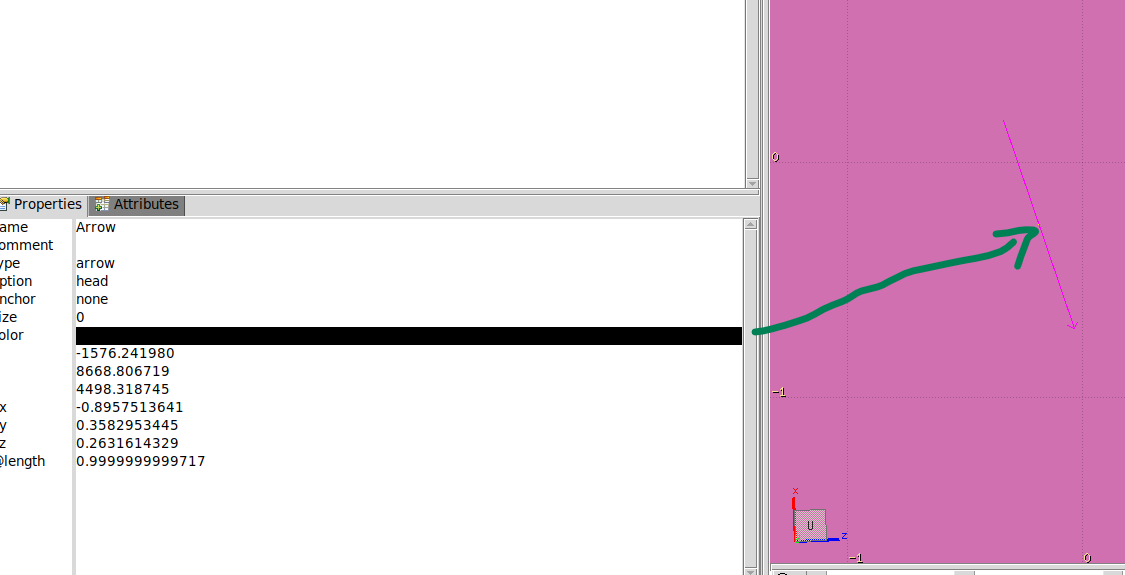
In the past, GEOFAR errors were noticed and the code could not recover as the error(s) is/are repeated and fatal. Even by drawing the arrow Object in the Geoviwer, no erroneous area is noticeable.. However I thought these would be finally corrected by removing all duplicated planes.
In short it is a complicated problem and some guidance and help is much needed
Furthermore if the proof for these errors is needed…The files are too large to attach – I only show here the err:
—————————————————————————————————————————-
Geofar: Particle in region 1010 (cell # 0)
in position -1.576241980E+03 8.668806719E+03 4.498318745E+03
is now causing trouble, requesting a step of 1.047187955E+01 cm
to direction -8.957513641E-01 3.582953445E-01 2.631614329E-01
end position -1.585622180E+03 8.672558744E+03 4.501074540E+03
R2: 8.810944825E+03 R3: 9.892806489E+03 cm error count: 0
XU (2D): 4.517913994E+03 XU (3D): 5.701698000E+03 cm
XUOLD(2D): 5.421552154E+03 XUOLD(3D): 2.204224389E+03 cm
Kloop: 163488933, Irsave: 1039, Irsav2: 1010, error code: -33 Nfrom: 5000
old direction -4.361360895E-01 5.461070127E-01 -7.152289438E-01, lagain, lstnew, lsense, lsnsct F F F T
Particle index 7 total energy 1.022186555E-03 GeV Nsurf 0
Try again to establish the current region moving the particle of a 1.178255629E-07 long step
We succeeded in saving the particle: current region is n. 1010 (cell # 0)
Geofar: Particle in region 1010 (cell # 0)
Try again to establish the current region moving the particle of a 1.179473690E-07 long step
We succeeded in saving the particle: current region is n. 1010 (cell # 0)
Abort called from FLKAG1 reason TOO MANY ERRORS IN GEOMETRY Run stopped!
STOP TOO MANY ERRORS IN GEOMETRY
Following the advice on these two threads all similar planes in the area or interest have been deleted (plus the cases where planes and other bodies (e.g. RCC) touched). This was done by replacing one same plane by another.
When I run my input (attached), I get one of 3 errors:
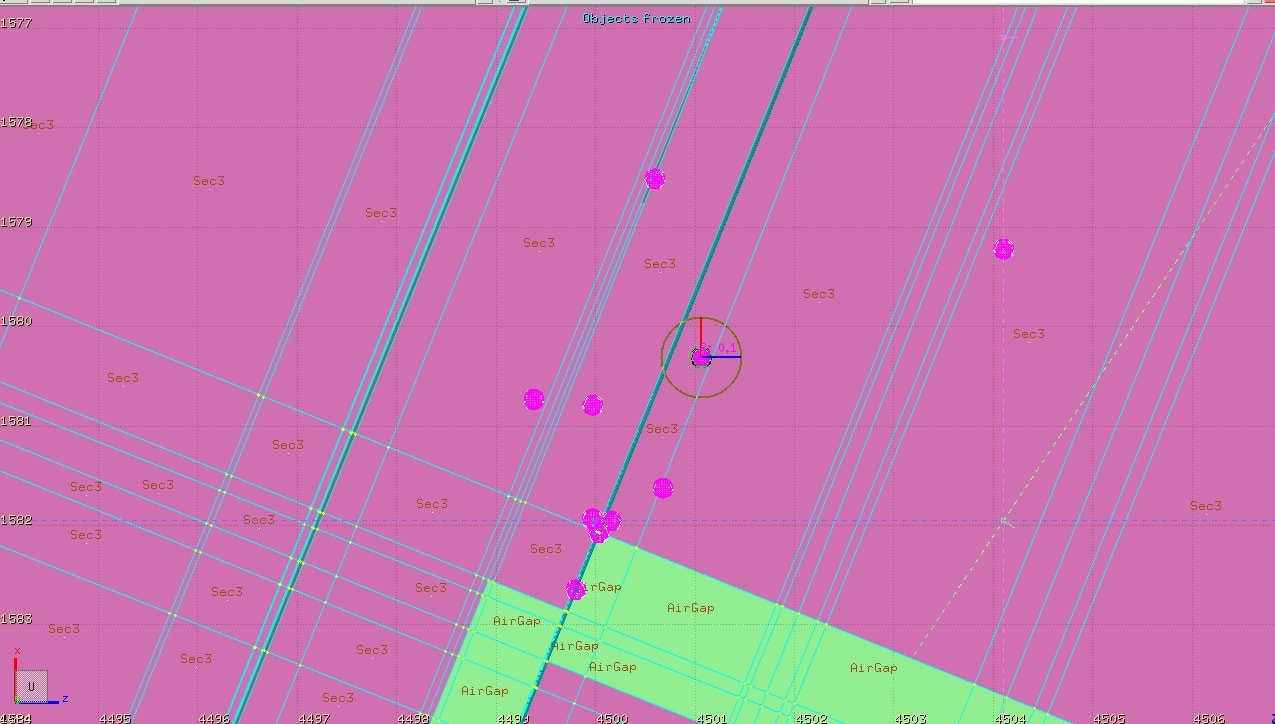
GEOFAR errors – these are the small geometrical errors which lead to numerical imprecision in the tracking. If one looks at these errors and adds them as arrows in the geoviewer, one sees that they don’t correspond to anything - they are not lying e.g. on the border of planes, they are in the middle of a region (as shown in the screenshot)
Runtime errors: Segmentation fault (core dumped) ${EXE} 2> $LOGF > $LOGF fluka run” or (“Seed file not accepted: or corrupted…”
Regarding the cluster issue – I am able to run other input files there so the issue must be exclusively in this input
The GEOFAR errors can be overcome by setting the accuracy parameter to 0.1 in GEOBEGIN (this was tested for 100k particles, maybe with more histories, more errors shall emerge)
I attach my latest input as starter to test out – it has the accuracy parameter to 0.1. For this case the simulation was successful, I also attach the log file corresponding to it.
I have managed to solve the runtime error by just disabling some of the USRBIN cards (which were causing memory allocation issues) !! It works alright. With your green light I will keep running the input. The GEOFAR errors keep coming though…
What I understand why it worked on the Local machine and not on the cluster (where there are GEOFAR errors) is - when RPP is broken into Planes, it increases the body no. which increases the file size,
Here I can correlate both, Increased no. of bodies are being handled by the local machine which is not having memory limit.
and, the increased no. of planes are the area of trouble for the Cluster, which could possibly mean, cluster is having trouble transferring the particle from multiple plane…(?)
thanks for your patience. I ran your input on my local machine and on the cluster for several CPU days to see if I was able to reproduce your error. After roughly 36 CPU hours, I was finally able to crash on my cluster. I did not test such extensive load on my machine.
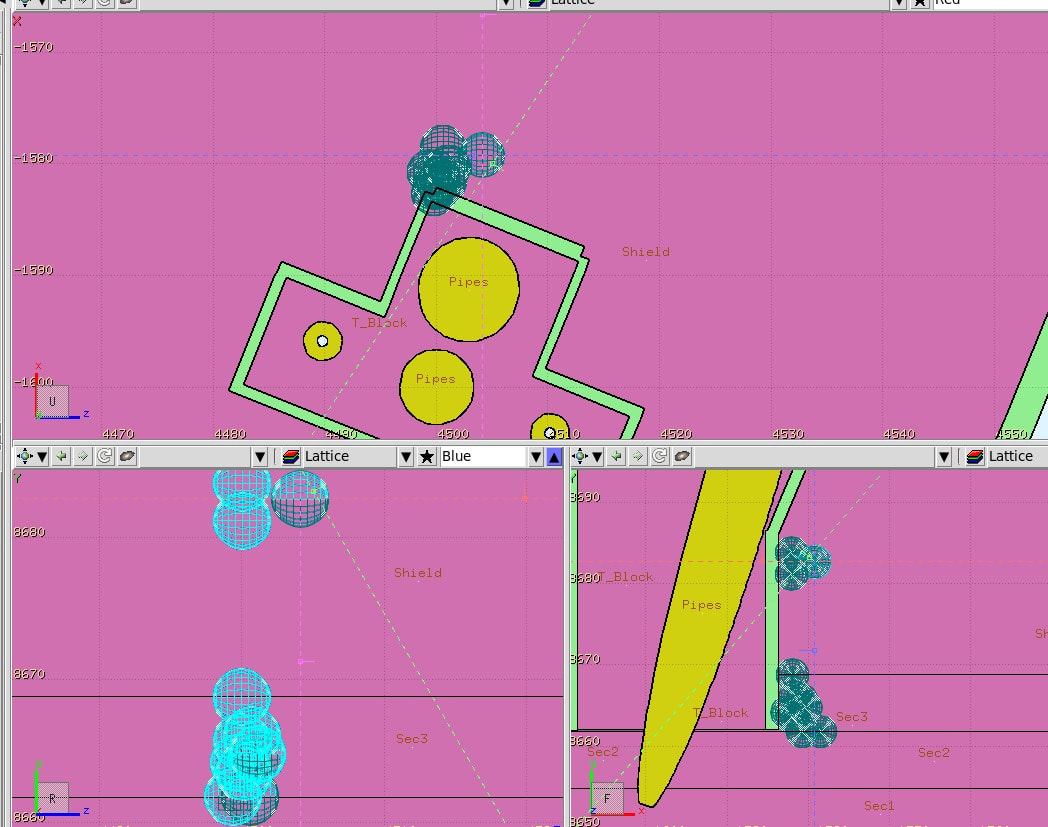
The culpript seems to be T_Block region, looking at the error files, but this is not definitive. In general, considering the size of the geometry any detailed debug would certainly be challenging. I agree with you, there is an enormous number of bodies in your geometry which reflects the detail required by your simulation.
To me is not clear wheter the tracking algorithm fails due to the geometry complexity or if there is a genuine problem in the geometry.
Now, while I do not have a definitive answer of what goes wrong in the cluster vs loclal machine, I would still encourage you in thinking if part of the geometry can be simplified.
Conversely, in the case where having detailed bodies is vital, also a UMESH based approach could be helpful.
Thanks for your answer and for checking!! How many histories did you simulate? Was the crash due to the GEOFAR errors?
I’ve come up with another strategy – that is to make many of the planes the same and then simply delete find and replace the clones. This reduces the number of bodies which should in principle ease the complexity of the problem..
Also e.g. locally I can run with 1e5 particles..this already could be enough for the problem. Should I trust these results knowing that with 1e6 particles on the cluster it fails?
the realisation for the plane technique came when plotting the errors. Most of these errors occur where the density of planes is high (see pink /green spheres centered on the error points)