Hi,
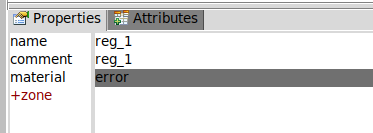
I am using unstructured mesh (meshed from stl to abaqus using the provided script in geom_mesh_utils) and I’m getting a sub-region “reg_1” which cannot be deleted:
With material “error”. If I add multiple meshes, the subregion is always created in the last defined mesh. How to fix this? I am using flair v3.5 and FLUKA v4.5.
It’s fine to have a reg_1 after meshing via script.
Fluka/Flair uses a bounding box region for unstructured mesh (default name UMESH) with material assigned as Vacuum. Your actual CAD geometry after meshing from .STL file is reg_1 (sub-region inside) without any material assigned ( thus error), material should be set manually.
The script, by default, is using a naming convention for N regions as reg_N, so if you plan to load multiple meshes into Fluka created via script you must change a template name to something else by providing an extra argument:
FLUKA_mesh_fix.py CAD.stl --regname (region name in Abaqus/FLUKA, default is “reg”).
Otherwise, with the default name, your next loaded mesh will overwrite the previous one.
Thanks for your answer…actually my issue was that only one region was being created despite there being 3 separate stl files. It seems the tree structure in Fusion360 cannot produced multiple stl bodies within one stl file. It either creates 3 separate stl files or 1 stl file with the combined bodies. I found out that if instead one converts stp to 3mf and then inputs the 3mf in the script you wrote then the regions are correctly and separately defined!
Yes, it’s one of the limitations of .STL format. It describes only a single enclosed surface. The .3mf format is the one which I recommend to use with the script as the most robust option👍
Be aware that in some other CAD programs , however, .3mf might also appear as a union of all bodies.or may have limited resolution (like in Fusion 360).