DVH calculation in ICRP-145 mesh phantom

Dear FLUKA Experts,

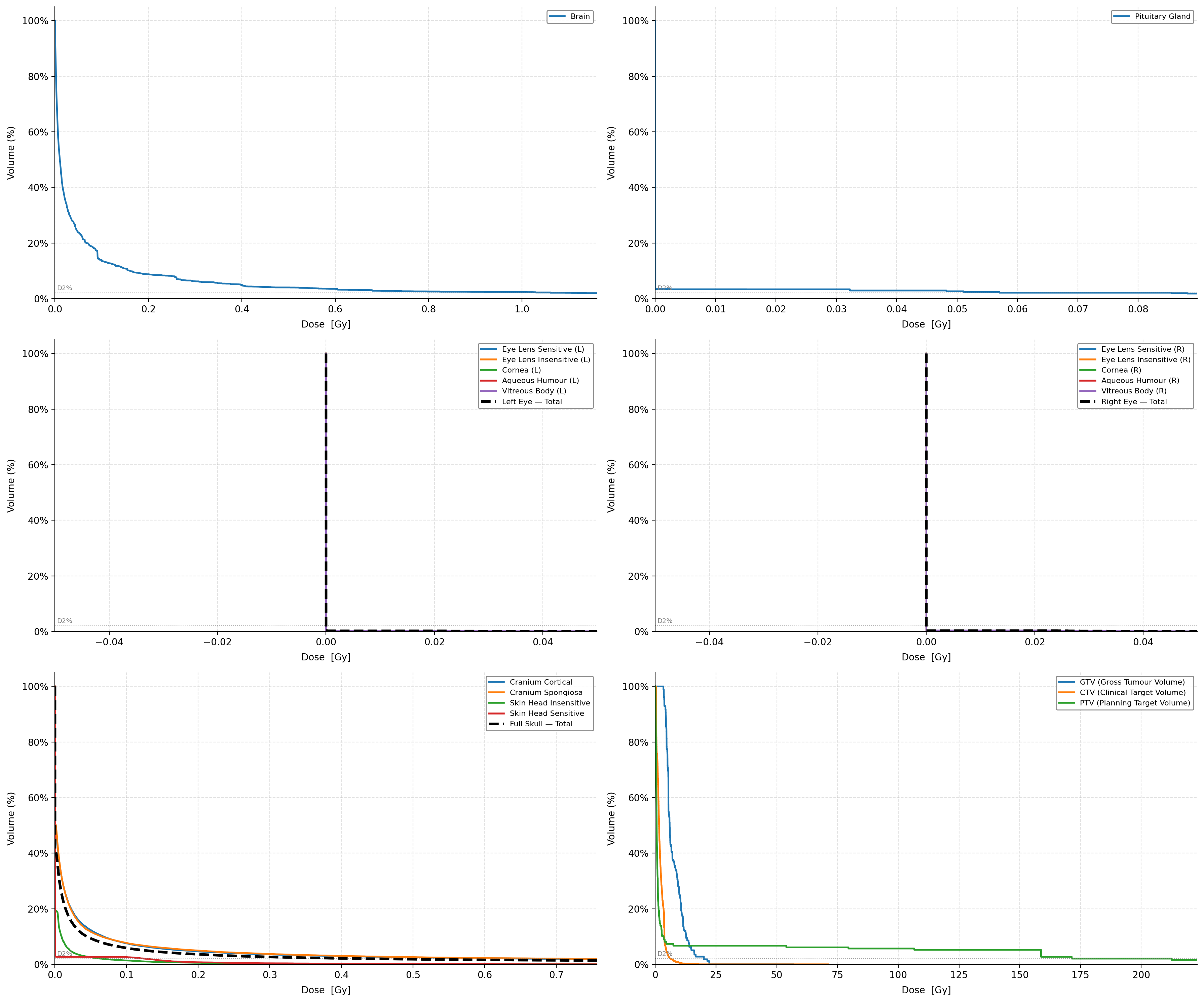
I am working on ICRP-145 mesh phantom, I need to calculate the Dose-Volume Histogram (DVH) for several organs, including the Brain, Eye Lens, and Pituitary Gland.

Following previous discussions on the forum ( How to score DVH in mathematical phantom ), I understand the standard workflow is to score dose in a 3D grid using a Cart USRBIN. I have two specific questions :

1- Since ICRP-145 is a mesh phantom, how can I precisely identify which voxel in my Cart USRBIN belongs to which specific organ region?

2- When defining the X/Y/Z boundaries of the USRBIN, should the grid cover the entire volume containing all organs of interest, or should a separate USRBIN be defined for each organ? :

From my .log file, I extracted the following geometric information for some organs (region ID, density, volume, and bounding box):


> Organ	FLUKA_Region	AM_ID	Density(g/cm³)	Volume(cm³)	Mass(g)	Xmin	Xmax	Ymin	Ymax	Zmin	Zmax
> Brain	83	AM6100	1.041	1457.63	1517.3	-7.117	6.760	-8.742	8.890	73.183	86.548
> Pituitary_gland	158	AM11400	1.031	0.60312	0.622	-0.226	0.867	-2.469	-1.142	76.391	78.026
> Left_eye_components											
> Eye_lens_sensitive(L)	88	AM6600	1.060	0.03669	0.0389	3.048	4.048	-9.049	-8.897	77.186	78.186
> Eye_lens_insensitive(L)	89	AM6601	1.060	0.17856	0.1893	3.048	4.048	-9.049	-8.629	77.186	78.186
> Cornea(L)	90	AM6700	1.087	1.0121	1.100	2.338	4.758	-9.384	-6.845	76.476	78.896
> Aqueous_humour(L)	91	AM6701	1.014	0.30007	0.3043	2.759	4.337	-9.324	-8.897	76.896	78.475
> Vitreous_body(L)	92	AM6702	1.019	5.9379	6.052	2.395	4.701	-8.893	-6.899	76.533	78.839
> Right_eye_components											
> Eye_lens_sensitive(R)	93	AM6800	1.060	0.03669	0.0389	-3.277	-2.277	-9.243	-9.091	77.165	78.165
> Eye_lens_insensitive(R)	94	AM6801	1.060	0.17856	0.1893	-3.277	-2.277	-9.243	-8.823	77.165	78.165
> Cornea\_(R)	95	AM6900	1.087	1.0121	1.100	-3.987	-1.567	-9.578	-7.039	76.455	78.875
> Aqueous_humour(R)	96	AM6901	1.014	0.30007	0.3043	-3.566	-1.988	-9.518	-9.091	76.876	78.454
> Vitreous_body(R)	97	AM6902	1.019	5.9379	6.052	-3.930	-1.624	-9.088	-7.093	76.512	78.818
> Skull											
> Cranium_cortical	50	AM2600	1.904	298.57	568.6	-7.537	7.182	-10.916	9.623	72.426	87.432
> Cranium_spongiosa	51	AM2700	1.252	327.96	410.6	-7.277	6.891	-9.930	9.310	72.585	87.259
> Skull_skin											
> Skin_head_insensitive	166	AM12200	1.088	238.04	259.0	-8.895	9.578	-13.603	10.623	62.329	88.145
> Skin_head_sensitive	167	AM12201	1.088	7.7778	8.46	-8.890	9.577	-13.598	10.618	62.336	88.139


Dear @m.assalmi,

You could use the USRBIN scoring with

  • Type Region to score in each regions (Mesh or standard FLUKA regions) separately, or
  • Type UMesh to score in each tetrahedral element of the mesh. This is useful for the 2D color plots.

Cheers,
David

Dear David,

Thank you for your reply and suggestions.

I tried using USRBIN with Type REGION to score the dose in each organ region of the mesh phantom. However, this approach provides only a single average dose value per region. Since the Dose-Volume Histogram (DVH) requires plotting Volume (%) versus Dose (Gy), it needs a distribution of dose values inside the organ, not just one value.

Therefore, I also tested USRBIN with Type UMESH, which gives the dose scored in each tetrahedral element of the mesh.

The output is a matrix of dose values for the tetrahedral elements, for example in the text output format like:

root@DESKTOP-EAIEEGN:/mnt/c/Manal/S-Value/UterusAF# head -200 AF002_fort.25
 *****  AP geometry, 1 MeV                                                                *****

           DATE:  3/13/26,  TIME: 21:00:17

          Total number of particles followed          10000, for a total weight of  1.0000E+04


   Unstructured Mesh binning n.   3  "U_Wall_Ins" , generalized particle n.  228
      ***** bins corresponding to the element-id:
      from element      0 to element ****** in step of     1
      accurate deposition along the tracks requested
       0.0000E+00  0.0000E+00  0.0000E+00  0.0000E+00  0.0000E+00  0.0000E+00  0.0000E+00  0.0000E+00  0.0000E+00  0.0000E+00
       0.0000E+00  0.0000E+00  0.0000E+00  0.0000E+00  0.0000E+00  0.0000E+00  0.0000E+00  0.0000E+00  0.0000E+00  0.0000E+00
       0.0000E+00  0.0000E+00  0.0000E+00  0.0000E+00  0.0000E+00  0.0000E+00  0.0000E+00  0.0000E+00  0.0000E+00  0.0000E+00
       0.0000E+00  0.0000E+00  0.0000E+00  0.0000E+00  0.0000E+00  0.0000E+00  0.0000E+00  0.0000E+00  0.0000E+00  0.0000E+00
       0.0000E+00  0.0000E+00  0.0000E+00  0.0000E+00  0.0000E+00  0.0000E+00  0.0000E+00  0.0000E+00  0.0000E+00  0.0000E+00
       0.0000E+00  0.0000E+00  0.0000E+00  0.0000E+00  4.8576E-09  0.0000E+00  0.0000E+00  0.0000E+00  0.0000E+00  0.0000E+00
       0.0000E+00  0.0000E+00  0.0000E+00  0.0000E+00  0.0000E+00  0.0000E+00  0.0000E+00  0.0000E+00  0.0000E+00  0.0000E+00
       0.0000E+00  1.0207E-08  0.0000E+00  0.0000E+00  0.0000E+00  0.0000E+00  0.0000E+00  0.0000E+00  0.0000E+00  0.0000E+00

This seems suitable for constructing a DVH, since each tetrahedron has its own dose value. My question is:

How can I identify which tetrahedral elements belong to a given organ (Uterus, urinary bladder, etc) in the ICRP-145 mesh phantom? is there a way in FLUKA to obtain the mapping between tetrahedral element IDs and the corresponding organ/region, so that I can group the elements belonging to each organ and compute the DVH?
AF.inp (138.1 KB)
source_newgen_with_regionsource.f (20.2 KB)

Best regards,
M. Assalmi

Hi @m.assalmi

I will look into your problem on the week just before Easter. Sorry for the delay!

Cheers,

Jerzy

Hi Jerzy,

Thank you for your reply. I will wait for your update.

Best regards,
m.assalmi